Vehicle Acceleration Monitor 3.0(Final)
1.283
14
1.283
14
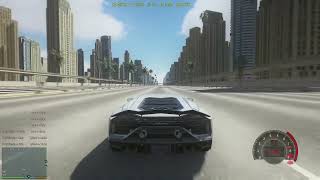
This is a vehicle performance testing script for GTA V, built on Script Hook V .NET. It measures and displays real-time acceleration data, braking distance/time, mile pass-through time/exit speed, and top speed. It is ideal for comparing the performance of different vehicles side by side.
Main Features
0–100 / 0–200 / … / 0–Top Speed Acceleration Timing
Automatically records the time and distance traveled when accelerating from a standstill to each 100 km/h increment (starting from 100 km/h).
Braking Test
After reaching 100/200/…/1000 km/h under full braking, records the distance and time required to come to a complete stop.
Mile Timing (1/4 Mile, 1/2 Mile, 1 Mile, etc.)
Displays the time and instantaneous speed when passing each mile marker from a standing start.
Top Speed Recording
The maximum speed achieved during a single test run is constantly shown on screen.
Customizable HUD Layout
All display positions, font sizes, and colors can be freely adjusted via the INI file, with support for hot reloading.
Hotkey Control
Press the default I key to toggle the script on/off, and F5 to reload the configuration (both can be changed in the INI).
Prerequisites
Script Hook V (developed by Alexander Blade)
Download: http://www.dev-c.com/gta5/scripthookv/
Script Hook V .NET (.NET script support based on Script Hook V)
Download: https://github.com/crosire/scripthookvdotnet/releases
Installation
1. Make sure both prerequisites above are installed and the game can load .NET scripts properly.
2. Place VehiclePerformanceTracker.cs (or the compiled .dll) into the "scripts" folder inside the game's root directory.
3. On first run, a "scripts\VehiclePerformanceTracker.ini" configuration file will be automatically generated; edit it as needed.
4. In-game, press the default I key to enable the script; start driving any land vehicle from a standstill to begin recording.
Notes
- The script only works when the engine is running and the player is inside a vehicle. Stopping or exiting the vehicle will automatically reset the test.
- All times are displayed to a precision of 0.001 seconds, distances to 0.1 meters, and speeds are in km/h.
------------------ Configuration File Comments ---------------------
[Settings]
# Script update interval (in milliseconds). Smaller values mean faster refresh. Default: 5
Interval=5
# Hotkey to reload the configuration. Default: F5
ReloadKey=F5
# Hotkey to toggle the script on/off. Default: I
ToggleKey=I
[HUD]
# ---- Acceleration Test Display ----
# Format: X position, Y position, line spacing, font size
# Displays 0-XXX km/h acceleration time and distance.
# Text is left-aligned. The first entry appears at the coordinate point, subsequent entries shift upward by the line spacing value.
Acc=0.4,0.969,0.035,0.3
# ---- Braking Test Display ----
# Same format as above. Displays XXX-0 km/h braking distance and time.
# Text is left-aligned. The first entry appears at the coordinate point, subsequent entries shift upward by the line spacing value.
Brake=0.725,0.969,0.035,0.3
# ---- Mile Timing Display ----
# Same format as above. Displays passing time and instantaneous speed for 1/4mi, 1/2mi, 1mi, etc.
# Text is center-aligned. The first entry appears at the coordinate point, subsequent entries shift upward by the line spacing value.
Mi=0.625,0.969,0.035,0.3
# ---- Top Speed Display ----
# Format: X position, Y position, font size
# Text is center-aligned. Constantly shows the highest speed reached.
Top=0.05,0.82,0.25
Version 3.0 Update Notes:
1.Greatly simplified the configuration file format, making it much clearer at a glance.
2.Removed unnecessary pop-up notifications when toggling the script on/off.
3.Changed the script's default state from enabled to disabled. Now, if you need to start testing, press the default toggle key (I) after entering a vehicle; otherwise, the script will remain off.
Main Features
0–100 / 0–200 / … / 0–Top Speed Acceleration Timing
Automatically records the time and distance traveled when accelerating from a standstill to each 100 km/h increment (starting from 100 km/h).
Braking Test
After reaching 100/200/…/1000 km/h under full braking, records the distance and time required to come to a complete stop.
Mile Timing (1/4 Mile, 1/2 Mile, 1 Mile, etc.)
Displays the time and instantaneous speed when passing each mile marker from a standing start.
Top Speed Recording
The maximum speed achieved during a single test run is constantly shown on screen.
Customizable HUD Layout
All display positions, font sizes, and colors can be freely adjusted via the INI file, with support for hot reloading.
Hotkey Control
Press the default I key to toggle the script on/off, and F5 to reload the configuration (both can be changed in the INI).
Prerequisites
Script Hook V (developed by Alexander Blade)
Download: http://www.dev-c.com/gta5/scripthookv/
Script Hook V .NET (.NET script support based on Script Hook V)
Download: https://github.com/crosire/scripthookvdotnet/releases
Installation
1. Make sure both prerequisites above are installed and the game can load .NET scripts properly.
2. Place VehiclePerformanceTracker.cs (or the compiled .dll) into the "scripts" folder inside the game's root directory.
3. On first run, a "scripts\VehiclePerformanceTracker.ini" configuration file will be automatically generated; edit it as needed.
4. In-game, press the default I key to enable the script; start driving any land vehicle from a standstill to begin recording.
Notes
- The script only works when the engine is running and the player is inside a vehicle. Stopping or exiting the vehicle will automatically reset the test.
- All times are displayed to a precision of 0.001 seconds, distances to 0.1 meters, and speeds are in km/h.
------------------ Configuration File Comments ---------------------
[Settings]
# Script update interval (in milliseconds). Smaller values mean faster refresh. Default: 5
Interval=5
# Hotkey to reload the configuration. Default: F5
ReloadKey=F5
# Hotkey to toggle the script on/off. Default: I
ToggleKey=I
[HUD]
# ---- Acceleration Test Display ----
# Format: X position, Y position, line spacing, font size
# Displays 0-XXX km/h acceleration time and distance.
# Text is left-aligned. The first entry appears at the coordinate point, subsequent entries shift upward by the line spacing value.
Acc=0.4,0.969,0.035,0.3
# ---- Braking Test Display ----
# Same format as above. Displays XXX-0 km/h braking distance and time.
# Text is left-aligned. The first entry appears at the coordinate point, subsequent entries shift upward by the line spacing value.
Brake=0.725,0.969,0.035,0.3
# ---- Mile Timing Display ----
# Same format as above. Displays passing time and instantaneous speed for 1/4mi, 1/2mi, 1mi, etc.
# Text is center-aligned. The first entry appears at the coordinate point, subsequent entries shift upward by the line spacing value.
Mi=0.625,0.969,0.035,0.3
# ---- Top Speed Display ----
# Format: X position, Y position, font size
# Text is center-aligned. Constantly shows the highest speed reached.
Top=0.05,0.82,0.25
Version 3.0 Update Notes:
1.Greatly simplified the configuration file format, making it much clearer at a glance.
2.Removed unnecessary pop-up notifications when toggling the script on/off.
3.Changed the script's default state from enabled to disabled. Now, if you need to start testing, press the default toggle key (I) after entering a vehicle; otherwise, the script will remain off.
Првпат Додадено: Декември 20, 2025
Последно Ажурирање: Април 26, 2026
Последно Симнување: пред 2 дена
20 Коментари
More mods by Lisztdreams:
This is a vehicle performance testing script for GTA V, built on Script Hook V .NET. It measures and displays real-time acceleration data, braking distance/time, mile pass-through time/exit speed, and top speed. It is ideal for comparing the performance of different vehicles side by side.
Main Features
0–100 / 0–200 / … / 0–Top Speed Acceleration Timing
Automatically records the time and distance traveled when accelerating from a standstill to each 100 km/h increment (starting from 100 km/h).
Braking Test
After reaching 100/200/…/1000 km/h under full braking, records the distance and time required to come to a complete stop.
Mile Timing (1/4 Mile, 1/2 Mile, 1 Mile, etc.)
Displays the time and instantaneous speed when passing each mile marker from a standing start.
Top Speed Recording
The maximum speed achieved during a single test run is constantly shown on screen.
Customizable HUD Layout
All display positions, font sizes, and colors can be freely adjusted via the INI file, with support for hot reloading.
Hotkey Control
Press the default I key to toggle the script on/off, and F5 to reload the configuration (both can be changed in the INI).
Prerequisites
Script Hook V (developed by Alexander Blade)
Download: http://www.dev-c.com/gta5/scripthookv/
Script Hook V .NET (.NET script support based on Script Hook V)
Download: https://github.com/crosire/scripthookvdotnet/releases
Installation
1. Make sure both prerequisites above are installed and the game can load .NET scripts properly.
2. Place VehiclePerformanceTracker.cs (or the compiled .dll) into the "scripts" folder inside the game's root directory.
3. On first run, a "scripts\VehiclePerformanceTracker.ini" configuration file will be automatically generated; edit it as needed.
4. In-game, press the default I key to enable the script; start driving any land vehicle from a standstill to begin recording.
Notes
- The script only works when the engine is running and the player is inside a vehicle. Stopping or exiting the vehicle will automatically reset the test.
- All times are displayed to a precision of 0.001 seconds, distances to 0.1 meters, and speeds are in km/h.
------------------ Configuration File Comments ---------------------
[Settings]
# Script update interval (in milliseconds). Smaller values mean faster refresh. Default: 5
Interval=5
# Hotkey to reload the configuration. Default: F5
ReloadKey=F5
# Hotkey to toggle the script on/off. Default: I
ToggleKey=I
[HUD]
# ---- Acceleration Test Display ----
# Format: X position, Y position, line spacing, font size
# Displays 0-XXX km/h acceleration time and distance.
# Text is left-aligned. The first entry appears at the coordinate point, subsequent entries shift upward by the line spacing value.
Acc=0.4,0.969,0.035,0.3
# ---- Braking Test Display ----
# Same format as above. Displays XXX-0 km/h braking distance and time.
# Text is left-aligned. The first entry appears at the coordinate point, subsequent entries shift upward by the line spacing value.
Brake=0.725,0.969,0.035,0.3
# ---- Mile Timing Display ----
# Same format as above. Displays passing time and instantaneous speed for 1/4mi, 1/2mi, 1mi, etc.
# Text is center-aligned. The first entry appears at the coordinate point, subsequent entries shift upward by the line spacing value.
Mi=0.625,0.969,0.035,0.3
# ---- Top Speed Display ----
# Format: X position, Y position, font size
# Text is center-aligned. Constantly shows the highest speed reached.
Top=0.05,0.82,0.25
Version 3.0 Update Notes:
1.Greatly simplified the configuration file format, making it much clearer at a glance.
2.Removed unnecessary pop-up notifications when toggling the script on/off.
3.Changed the script's default state from enabled to disabled. Now, if you need to start testing, press the default toggle key (I) after entering a vehicle; otherwise, the script will remain off.
Main Features
0–100 / 0–200 / … / 0–Top Speed Acceleration Timing
Automatically records the time and distance traveled when accelerating from a standstill to each 100 km/h increment (starting from 100 km/h).
Braking Test
After reaching 100/200/…/1000 km/h under full braking, records the distance and time required to come to a complete stop.
Mile Timing (1/4 Mile, 1/2 Mile, 1 Mile, etc.)
Displays the time and instantaneous speed when passing each mile marker from a standing start.
Top Speed Recording
The maximum speed achieved during a single test run is constantly shown on screen.
Customizable HUD Layout
All display positions, font sizes, and colors can be freely adjusted via the INI file, with support for hot reloading.
Hotkey Control
Press the default I key to toggle the script on/off, and F5 to reload the configuration (both can be changed in the INI).
Prerequisites
Script Hook V (developed by Alexander Blade)
Download: http://www.dev-c.com/gta5/scripthookv/
Script Hook V .NET (.NET script support based on Script Hook V)
Download: https://github.com/crosire/scripthookvdotnet/releases
Installation
1. Make sure both prerequisites above are installed and the game can load .NET scripts properly.
2. Place VehiclePerformanceTracker.cs (or the compiled .dll) into the "scripts" folder inside the game's root directory.
3. On first run, a "scripts\VehiclePerformanceTracker.ini" configuration file will be automatically generated; edit it as needed.
4. In-game, press the default I key to enable the script; start driving any land vehicle from a standstill to begin recording.
Notes
- The script only works when the engine is running and the player is inside a vehicle. Stopping or exiting the vehicle will automatically reset the test.
- All times are displayed to a precision of 0.001 seconds, distances to 0.1 meters, and speeds are in km/h.
------------------ Configuration File Comments ---------------------
[Settings]
# Script update interval (in milliseconds). Smaller values mean faster refresh. Default: 5
Interval=5
# Hotkey to reload the configuration. Default: F5
ReloadKey=F5
# Hotkey to toggle the script on/off. Default: I
ToggleKey=I
[HUD]
# ---- Acceleration Test Display ----
# Format: X position, Y position, line spacing, font size
# Displays 0-XXX km/h acceleration time and distance.
# Text is left-aligned. The first entry appears at the coordinate point, subsequent entries shift upward by the line spacing value.
Acc=0.4,0.969,0.035,0.3
# ---- Braking Test Display ----
# Same format as above. Displays XXX-0 km/h braking distance and time.
# Text is left-aligned. The first entry appears at the coordinate point, subsequent entries shift upward by the line spacing value.
Brake=0.725,0.969,0.035,0.3
# ---- Mile Timing Display ----
# Same format as above. Displays passing time and instantaneous speed for 1/4mi, 1/2mi, 1mi, etc.
# Text is center-aligned. The first entry appears at the coordinate point, subsequent entries shift upward by the line spacing value.
Mi=0.625,0.969,0.035,0.3
# ---- Top Speed Display ----
# Format: X position, Y position, font size
# Text is center-aligned. Constantly shows the highest speed reached.
Top=0.05,0.82,0.25
Version 3.0 Update Notes:
1.Greatly simplified the configuration file format, making it much clearer at a glance.
2.Removed unnecessary pop-up notifications when toggling the script on/off.
3.Changed the script's default state from enabled to disabled. Now, if you need to start testing, press the default toggle key (I) after entering a vehicle; otherwise, the script will remain off.
Првпат Додадено: Декември 20, 2025
Последно Ажурирање: Април 26, 2026
Последно Симнување: пред 2 дена


The currently known vulnerability is an error in the display of vehicle brake data. I will adjust it in future updates
@Lisztdreams what speedometer are you using? its yours? upload it please
@Neuromance I am using the dashboard module of XMOD. It works very well. https://www.gta5-mods.com/scripts/nfsgauge-rpm-gear-speedometer
很好可以作为racetimer的替代
@Lisztdreams What background map is that and where can i download?
@sabbir00015278 https://www.gta5-mods.com/maps/dubai-highway-add-on-sp-oiv-fivem
bro ur absolutely floodig the scripts section 😂😂😂
@Aztecz8798 I just tested it in Enhanced mode and it works well, but in my opinion, the information disappears very quickly when the vehicle stops. I think the 100-0 km/h value in meters is incorrect, and I've noticed that when the vehicle is stopped, some text appears at the top center, but another mod covers it up, and I'd like to disable it. The same goes for the text that appears when I press F5; some characters aren't loading correctly. I would also suggest a button or key combination to activate or deactivate the script.
I think it's a very interesting mod with a lot of potential.
@Antthony_12 i think u pinged the wrong person
@Aztecz8798 ouuuu I am very sorry!!!
@Antthony_12 np
@Lisztdreams I just tested it in Enhanced mode and it works well, but in my opinion, the information disappears very quickly when the vehicle stops. I think the 100-0 km/h value in meters is incorrect, and I've noticed that when the vehicle is stopped, some text appears at the top center, but another mod covers it up, and I'd like to disable it. The same goes for the text that appears when I press F5; some characters aren't loading correctly. I would also suggest a button or key combination to activate or deactivate the script.
I think it's a very interesting mod with a lot of potential.
@Antthony_12 First of all, thank you so much for your feedback. In the latest version, I have removed the yellow text that appeared at the top center of the screen when the vehicle comes to a stop. Currently, I am still working on fixing the calculation error for the brake time display data. I am also considering how to keep the parking HUD visible and make it fade out in a more natural way. All of these improvements are planned for the latest version update.😂
Nice, I'll be here waiting patiently :)
@Antthony_12 I have updated to version 2.0 and fixed many issues. You can download and try it out. I have written the update details at the end of the introduction
@Lisztdreams Now is perfect! Thanks you very much!
are u using izt's transmission mod?
@SenileServey2013 Yes, I used his Custom Gear Ratios and Manual Transmission
@Lisztdreams with a downgraded gta version?
gng